
SponsorBlock uses community-contributed segment timings to identify sponsors and other sections inside videos. Coverage depends on contributions: an unmarked segment cannot be skipped automatically.
Enable SponsorBlock
- Open Settings → Add-ons.
- Find SponsorBlock and turn on Enable SponsorBlock.
- Review each category’s skip option rather than assuming they all behave the same.
- Open a video with known segments and check the seek bar.
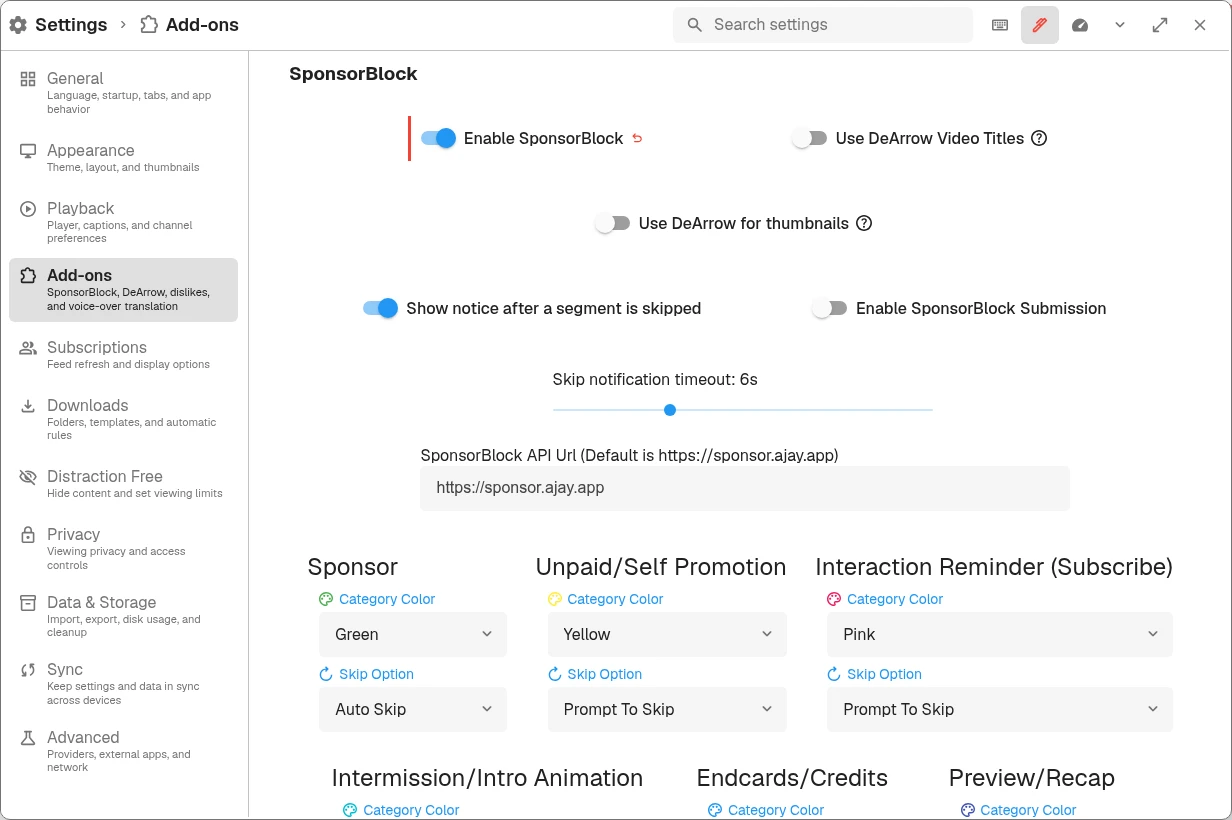
Enable SponsorBlock, then choose each category’s Skip Option. Categories can use different behaviors.
Choose a skip behavior
| Option | What it does |
|---|---|
| Auto Skip | Skips segments in that category automatically. |
| Prompt To Skip | Offers a choice when a segment is reached. |
| Show In Seek Bar | Marks the segment without automatically skipping it. |
| Do Nothing | Disables the category’s skipping behavior. |
Choose different behaviors for categories such as sponsorships and intros. Show notice after a segment is skipped controls the notification; it does not enable or disable skipping itself.
If the wrong part is skipped
- Check which category is responsible.
- Change that category to Prompt To Skip or Show In Seek Bar while investigating.
- Retry the affected section. If needed, temporarily disable SponsorBlock to compare playback.
Segment timing comes from contributors and can be inaccurate. When reporting an OpenTubeX problem, include the public video URL, segment time, category, and chosen behavior.
Contributions and identity
Enable SponsorBlock Submission is separate from enabling playback skipping. Review it if you want to contribute. Keep the SponsorBlock Private User ID private; it is not something to include in a bug report. Leaving the custom ID empty allows the app to use its generated ID.
Other add-ons
In Settings → Add-ons, review Use DeArrow Video Titles, Use DeArrow for thumbnails, and Enable Return YouTube Dislike if you want alternative titles, thumbnails, or dislike information. These are optional services and their results may differ from YouTube’s own display.
Enabling an add-on makes requests to its service. The privacy policy’s network exposure table describes what each service can observe. An add-on outage does not necessarily mean the video provider itself is unavailable.